
Passwordless Login and 2FA: customers sign in with an email OTP code module for PrestaShop

Version: 1.0.2 (2026-07-27) | Compatibility: PrestaShop 1.6.0.4 - 9.2.1
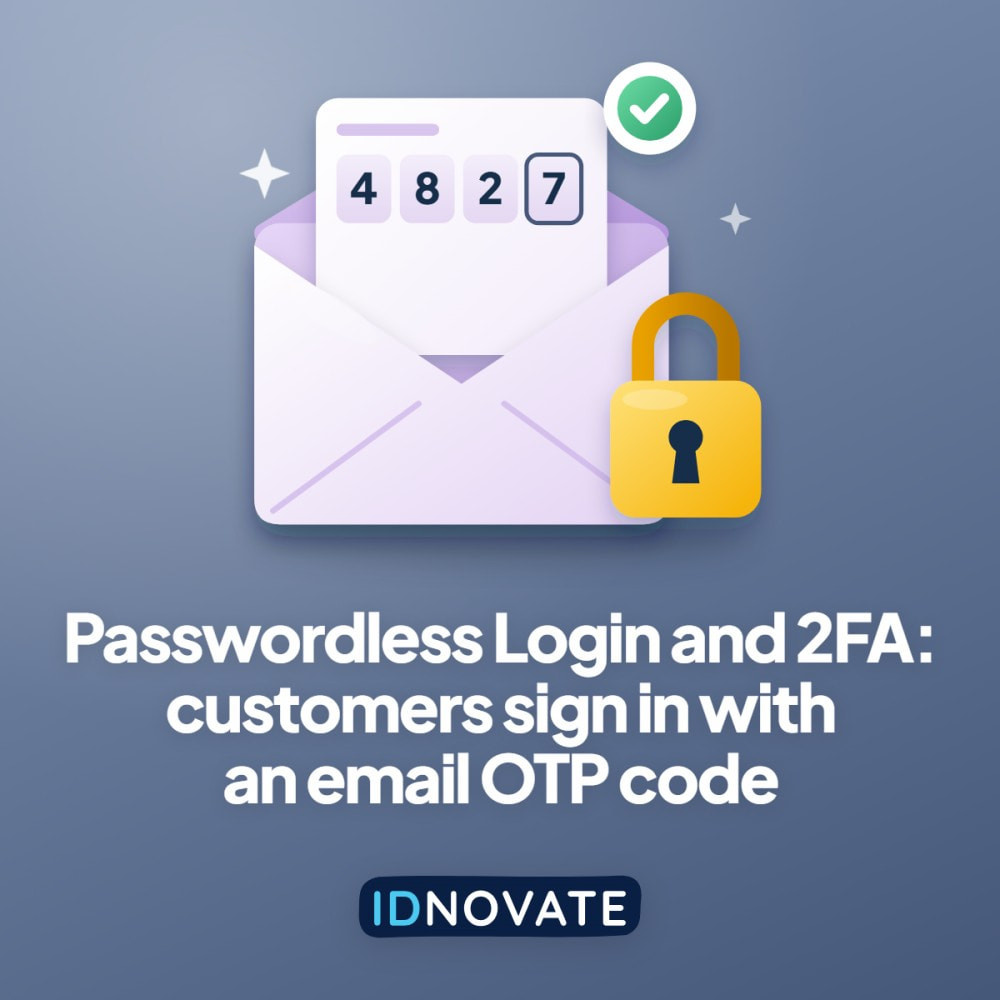
Passwordless login and two-factor authentication (2FA) for PrestaShop: customers sign in with a one-time code (OTP) sent by email. Fewer abandoned logins and password resets, secure customer accounts, no SMS fees or external services.
Support
  • 1 year Free
🛠️ Installation included: We can install the module in your store FOR FREE
🧬 Life-time free updates: You can ALWAYS download the last version
✅ Quality verified by PrestaShop: Validated by PrestaShop QUALITY Team
🤝 3 months1 year support: We are BY YOUR SIDE when you need it
Free $76.99 -100%
Tax excluded
Number of licenses
Accepted payment methods
−20%Black Friday: 20% offLive until the night of the 30th. Subscribe to the newsletter and we will send you the code.Exclusive codeGet it by email


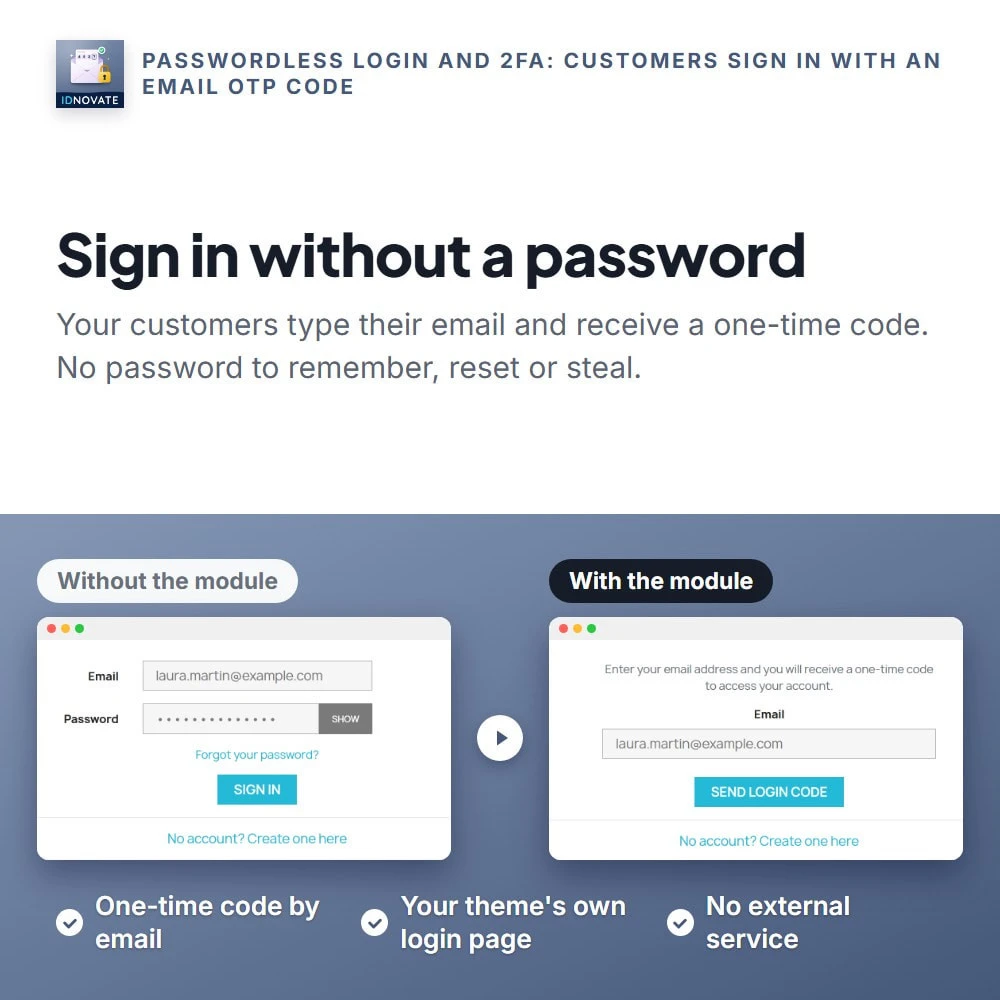
⚡ A forgotten password costs you the customer at the worst possible moment: in the middle of the checkout. They try twice, wait for a reset email that does not arrive, and too many of them simply leave. With our module they type their email, receive a one-time code and they are in: passwordless login, or the code on top of the password as two-factor authentication (2FA). No SMS fees and no external service: the codes are created in your shop and sent with your own email.

✅ Ideal for shops whose customers buy now and then and never remember their password, and for any shop whose customer accounts hold addresses, orders and vouchers worth protecting.


❓ Why choose our module?

  • Fewer customers lost at the login - nobody needs to remember a password to finish an order, and in a one-page checkout they sign in without leaving it.
  • Fewer support messages - no more "I forgot my password" emails, and no reset links lost in the spam folder.
  • Accounts much harder to break into - real two-factor authentication when you want it, codes that expire and work only once, and limits per email and per IP address.
  • No running costs - no SMS to pay for, no external service and no subscription: everything happens in your shop.
  • New sign-ups from lost visitors - an address with no account can receive an invitation to create one, instead of hitting a dead end.


❓ What makes this module essential for your shop?

  • Sign-in the way you want it

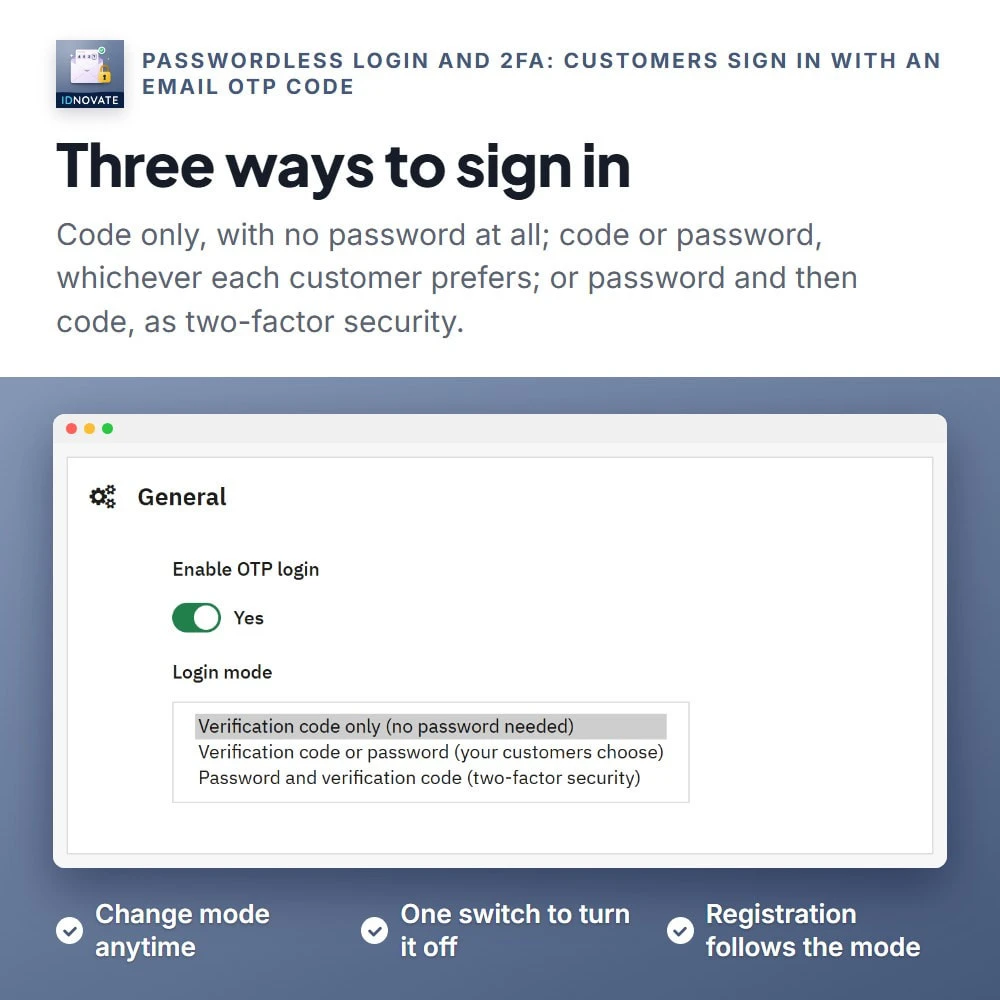
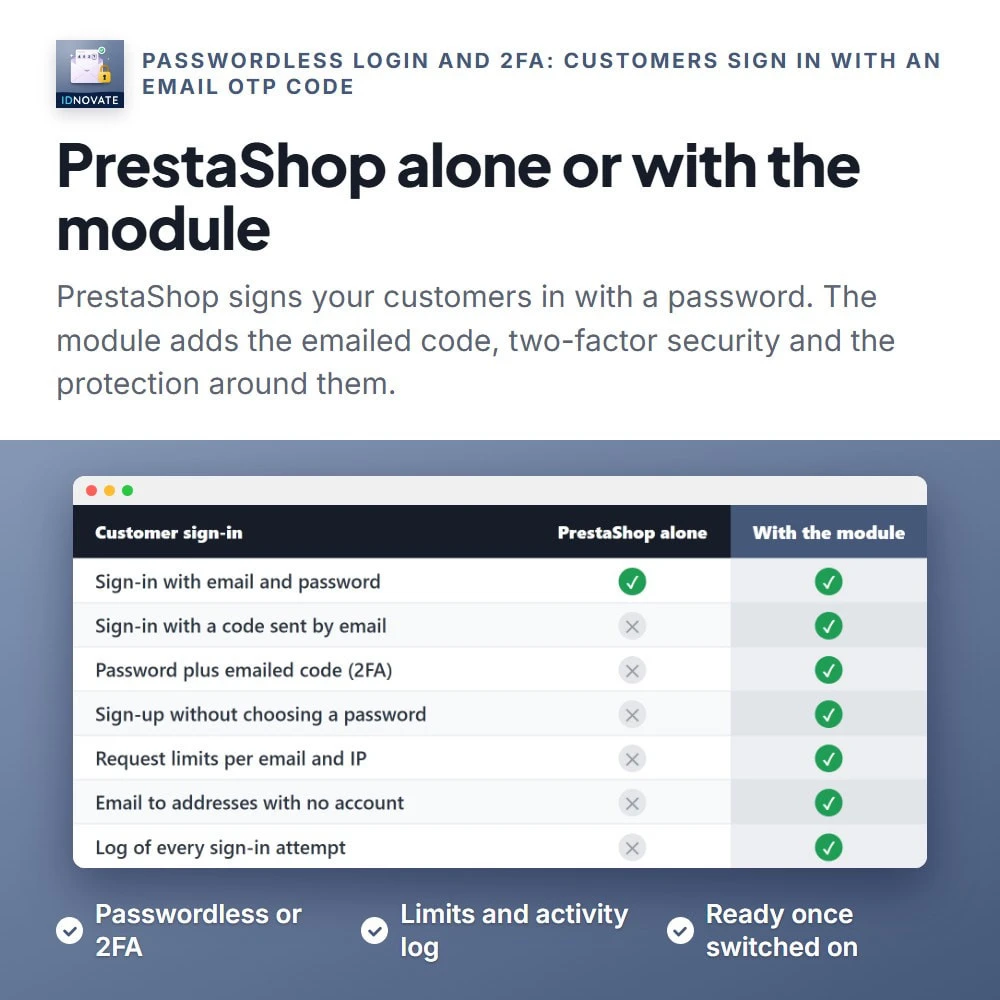
Choose the code only, for a fully passwordless login; the code or the password, whichever each customer prefers; or the password and then the code, as real two-factor authentication. Change the mode whenever you like, and the registration form follows it on its own. ⚡

  • A checkout that keeps the sale

In a one-page checkout the module replaces only the account block: the delivery and payment steps stay on screen and the order keeps its place while your customer signs in. Social logins and one-click checkouts keep working as before. ✅

  • Security your customers can see

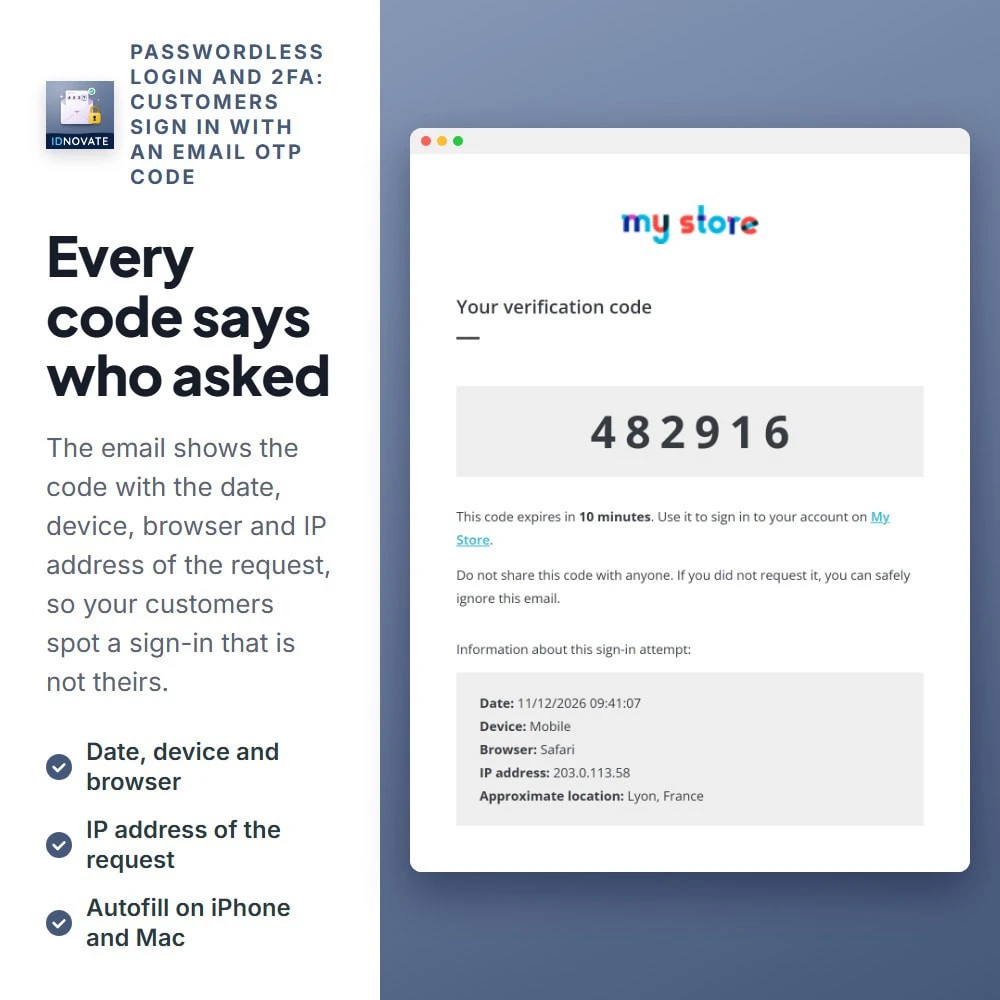
Every code email shows the date and time, the device, the browser and the IP address of the request, so your customers recognise their own sign-in or spot one that is not theirs. Only a protected fingerprint of each code is stored, and the sign-in page never reveals which addresses have an account. ✅

  • Effortless for your customers

The code panel appears on the login page of your own theme, so there is no new page to learn and it works as soon as you switch it on. On an iPhone, an iPad or a Mac the code is offered right above the keyboard: one tap and they are in. ✨

  • Everything under control

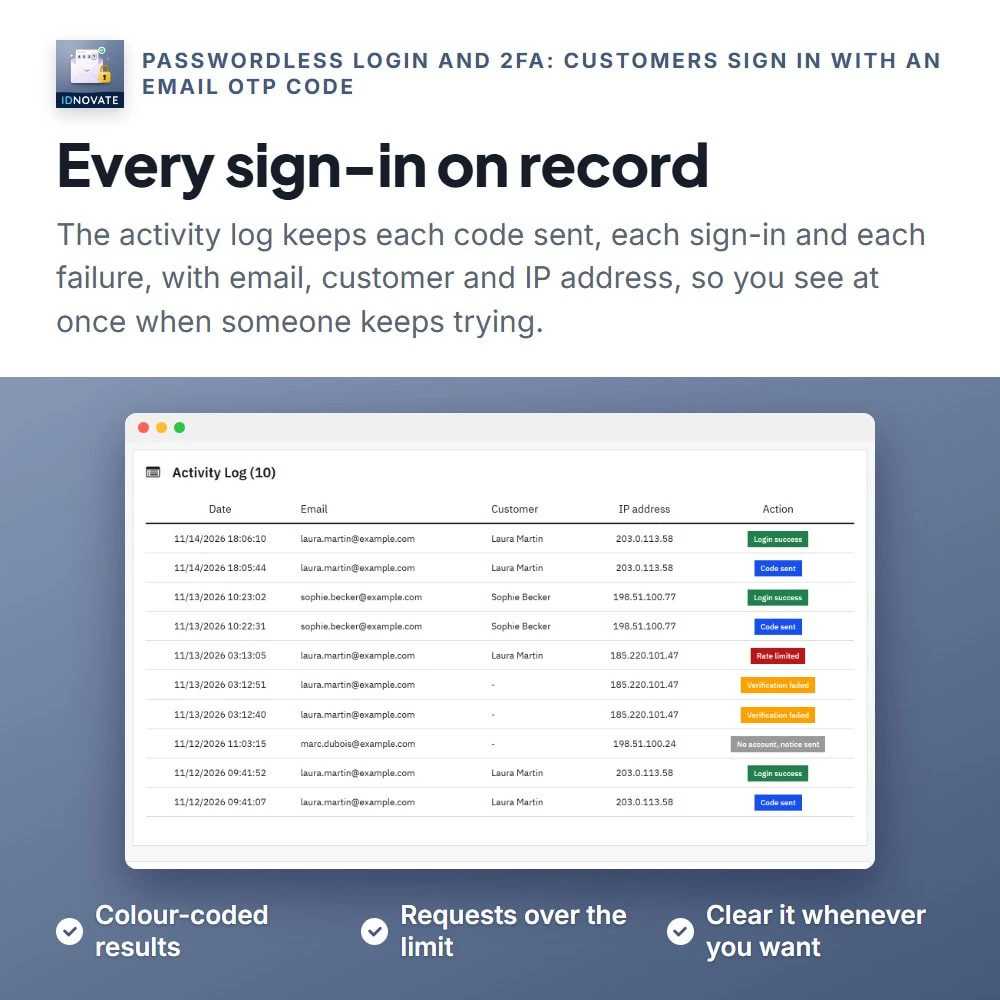
An activity log records every code sent and every sign-in with a colour-coded result, so you see at a glance who is signing in, who is not receiving their code and who is hitting the limits. ✅

❓ What are the main features of the module?

  • ⭐ Passwordless login and two-factor authentication
  • Verification code only: a true passwordless login. Your customer types their email, receives a one-time password (OTP) and is signed in, with nothing to remember and nothing to reset.
  • Code or password: the sign-in page leads with the email code, and a link underneath lets anyone who knows their password use it instead. Ideal if you want to introduce codes without forcing anybody.
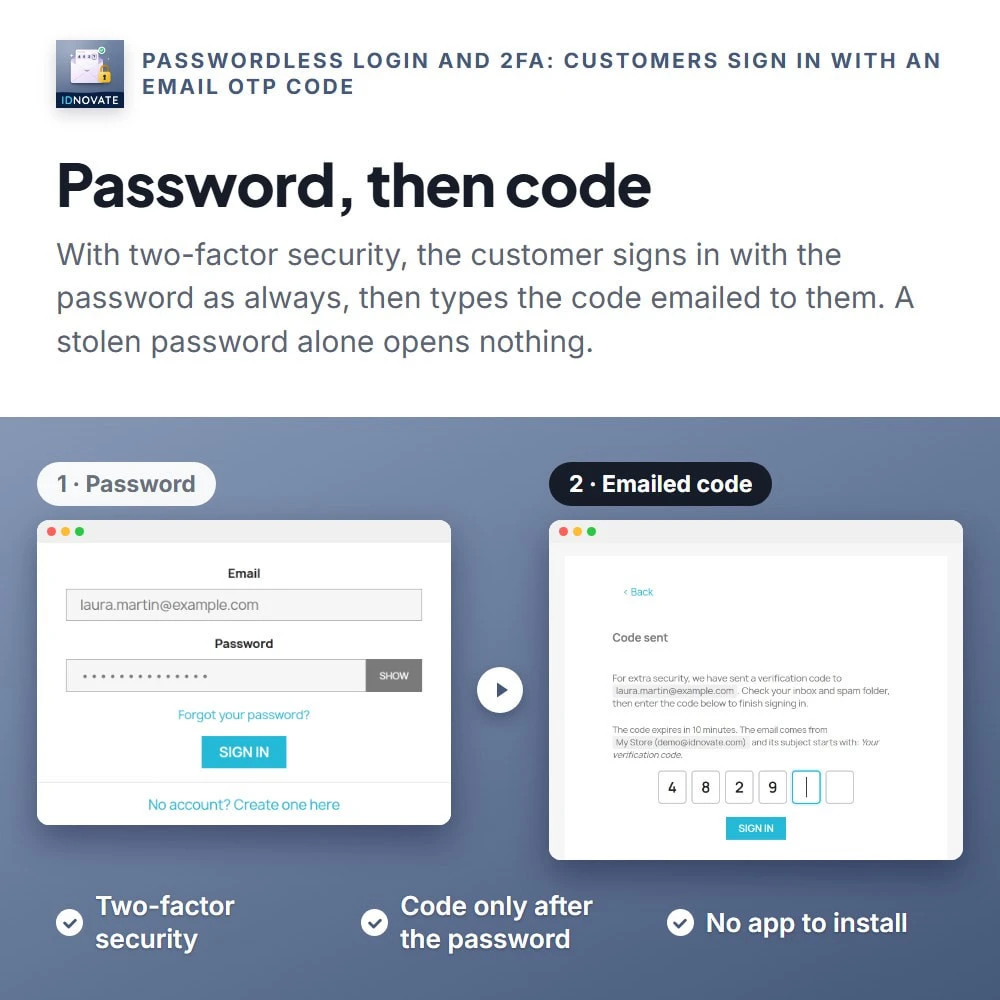
  • Password and verification code: the password is checked first and the emailed code is then required. This is real two-factor authentication (2FA): a stolen or reused password is no longer enough to get into an account.
  • Change the mode whenever you like, for example start with code or password and move to code only once your customers are used to it, or switch the module off with one click.
  • ✨ Registration and customer accounts
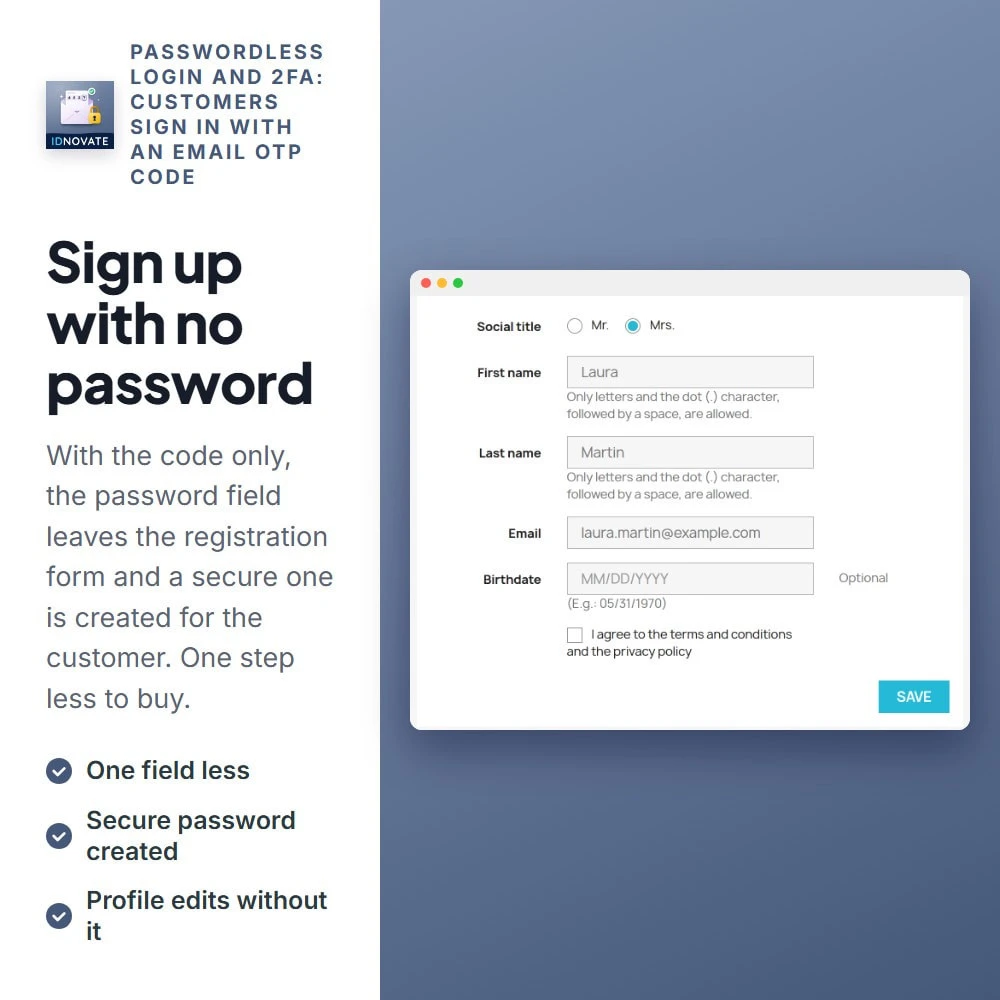
  • In the passwordless mode the registration form hides the password field and creates a secure random password behind the scenes: one field less to fill in and no password to invent.
  • In the other two modes customers choose their own password as usual, because they will still use it to sign in.
  • Customers who sign in with a code can edit their personal details in their account without being asked for a password they never set.
  • ⭐ One-time codes built for security
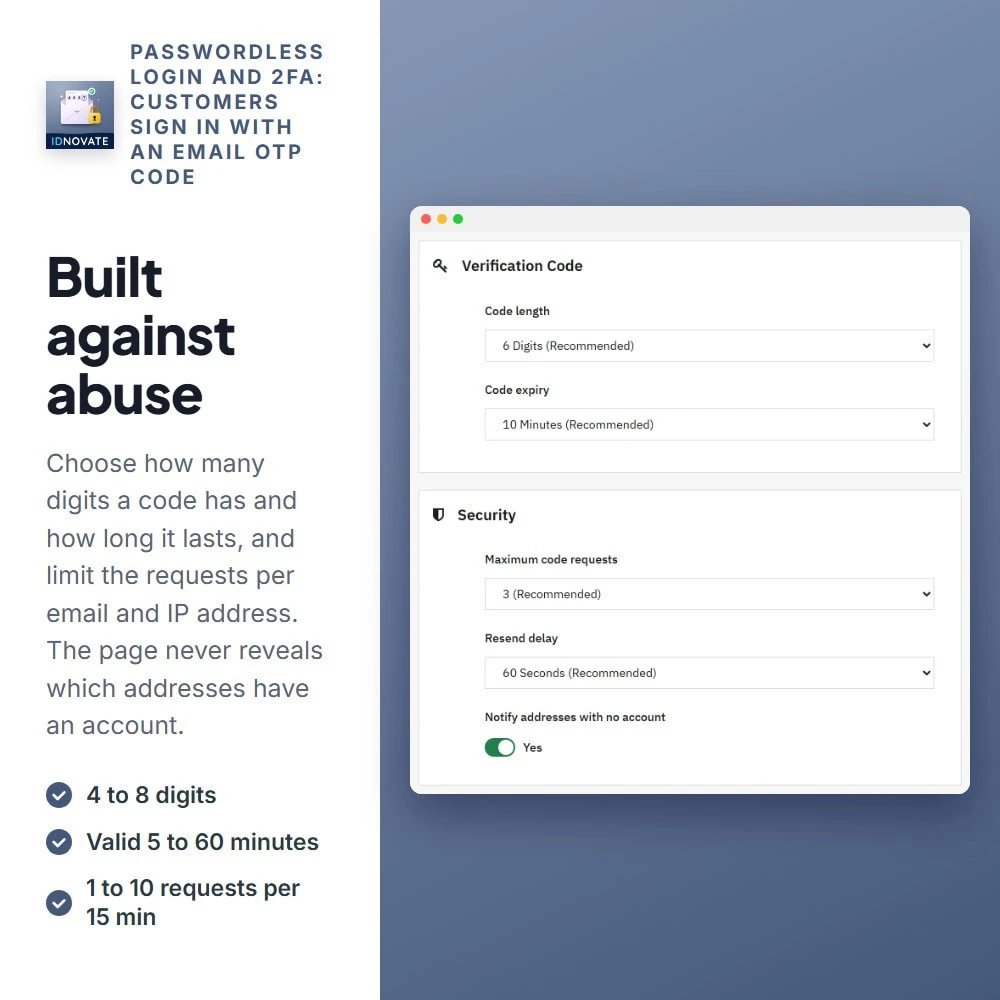
  • Choose the length and the lifetime of the code: 4, 5, 6 or 8 digits, valid for 5, 10, 15, 30 or 60 minutes. A 6-digit code valid for 10 minutes suits most shops; 8 digits and 5 minutes add a margin when accounts hold sensitive data.
  • Each code works only once and is cancelled after five wrong tries, so someone trying to guess a 6-digit code gets five chances out of a million.
  • Only a protected fingerprint of each code is stored: even if someone copied your database, they would not find a single usable code.
  • On an iPhone, an iPad or a Mac the code appears right above the keyboard, so your customer signs in with one tap instead of copying it from the email.
  • ⚙️ Protection against abuse and account takeover
  • Limit how many codes an email address can ask for, from 1 to 10 every 15 minutes. With a limit of 3, for example, nobody can flood one of your customers with code emails.
  • The same kind of limit applies to each IP address, so a single machine cannot work its way through your customer list asking for codes.
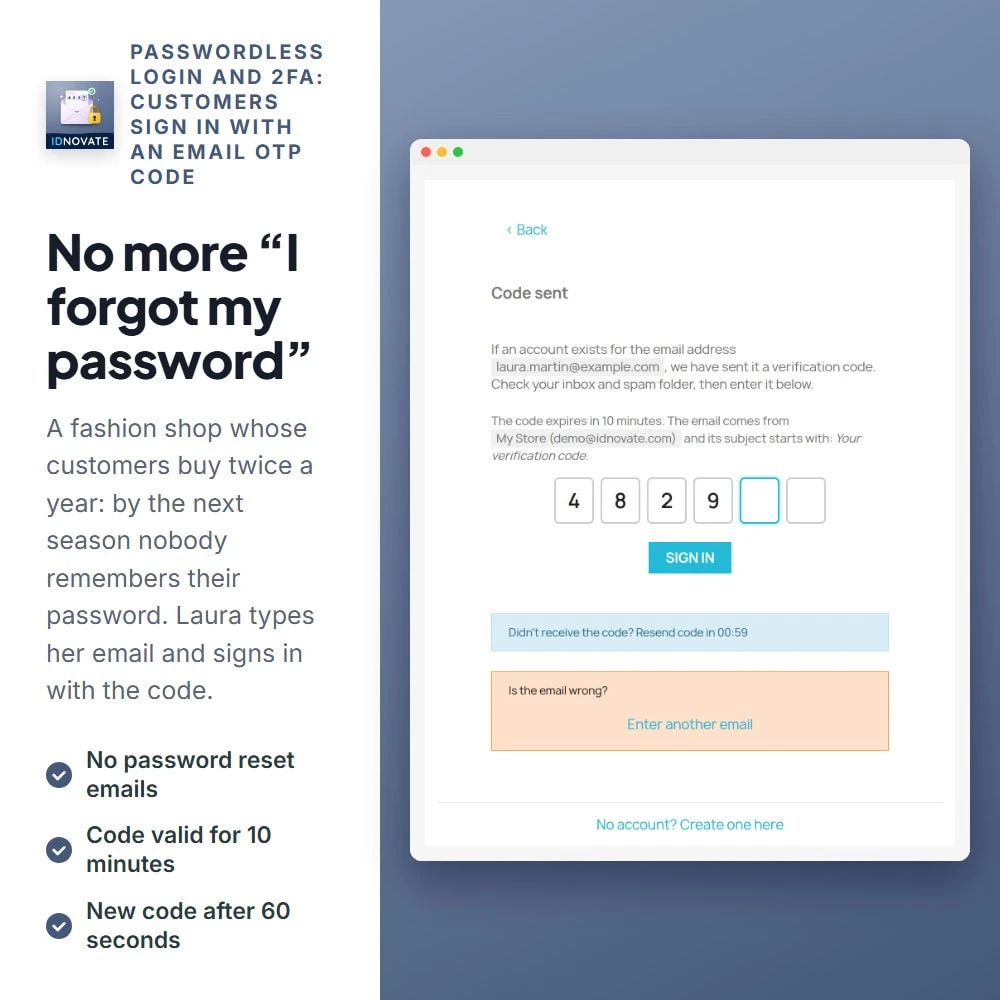
  • Set how long customers wait before asking for a new code, from 30 to 300 seconds, so an impatient double click does not send two emails.
  • The sign-in page gives exactly the same answer whether an address has an account or not, so nobody can use it to find out who your customers are.
  • ✉️ Email verification your customers can trust
  • The code email shows when, from which device, with which browser and from which IP address the code was requested, plus the approximate location when PrestaShop geolocation is installed. A customer who did not ask for it knows at once that something is wrong.
  • It is sent with your own PrestaShop email configuration and in each customer's language, so it looks like every other email from your shop.
  • Under the code boxes, the panel tells your customer how long the code lasts, who the email comes from and what its subject starts with, so they find it in seconds, even in the spam folder.
  • When someone asks for a code with an address that has no account, that address can receive an invitation to create one, at most once a day: a sign-in that would have failed becomes a new registration.
  • ➕ Your theme, your checkout and full control
  • The code panel is added to the login page your theme already draws: no redirect, no second login page and nothing new for your customers to learn.
  • In a one-page checkout only the account block is replaced, so delivery and payment stay on screen while your customer signs in. If your checkout is not recognised on its own, two settings point the module at its email field and its sign-in block.
  • Social logins and other sign-ins that do not use a password, such as Google, Facebook or PayPal buttons, keep working and are never blocked.
  • An activity log in the back office records every code sent and every sign-in with a colour-coded result, for example "code sent", "rate limited" or "login success", so you can answer a customer who says the code never arrived in a few seconds.
  • ℹ️ Good to know
  • There are no SMS fees, no external service and no paid account: the codes are created in your shop and sent with your own email, so a sign-in costs you nothing.
  • For advanced setups you can set the selectors of the password field and the "forgot password" link, add your own CSS and JavaScript, and react to each step of a code login from your theme or another module.
  • The Hooks section shows where the sign-in can appear in your shop and connects or disconnects each place with a click, and a maintenance tool checks and repairs the database and restores the email templates.
  • A user guide is included in the Documentation tab of the module.

FREQUENTLY ASKED QUESTIONS - FAQ

❓ Do I have to remove passwords from my shop?

➡️ No, that is your choice. Drop them with the verification code only mode, let each customer choose with the code or password mode, or keep them and add a second step with the password and verification code mode.


❓ Is this real two-factor authentication?

➡️ Yes, in the password and verification code mode. The password is checked first and the emailed code is then required, so both are needed to sign in.


❓ Will my customers mind waiting for an email?

➡️ The code is sent the moment it is requested, with your shop's own email, and it stays valid for the time you choose, from 5 to 60 minutes. Customers who would rather use their password can keep doing so in the code or password mode.


❓ What happens if a customer does not receive the code?

➡️ They can ask for a new one after the resend delay you set. The panel tells them who the email comes from and what its subject starts with, so they can find it in their spam folder, and every attempt is stored in the activity log.


❓ Do I need SMS credits, an external service or a paid account?

➡️ No. The codes are created in your shop and sent with your own PrestaShop email configuration, so there is nothing to pay per sign-in.


❓ Does it work with one-page checkouts?

➡️ Yes. Only the account block is replaced, and if your checkout is not recognised on its own, two settings let you point the module at its email field and its sign-in block.


❓ Is it compatible with social login (Google, Facebook, PayPal)?

➡️ Yes. Sign-ins that already identify the customer without a password are never blocked, so your social login and one-click checkout keep working.


❓ Does it change the look of my login page?

➡️ It reuses your theme's login page and adds the code panel, so your customers see the page they already know. The password field is only put away in the modes that lead with the code.


❓ What if someone asks for a code with an address that has no account?

➡️ The sign-in page shows the same message as always, so nobody can find out which addresses are registered. If you want, that address receives an email offering to create an account, at most once a day.


❓ Can customers register without a password?

➡️ In the verification code only mode, yes: the password field is hidden and a secure one is created for them. In the other two modes they choose their own, because the password still signs them in.


❓ What does the module store about sign-ins?

➡️ Each code request and sign-in goes to the activity log with the date, the email, the customer, the IP address and the result, and you can clear the log whenever you want. The codes themselves are kept only as a protected fingerprint.


❓ Does it protect the back office?

➡️ No. It protects your customers' accounts: the sign-in to your shop, the registration and the checkout.
Version
1.0.2 (2026-07-27)
Compatibility
1.6.0.4 - 9.2.1
Rating
0
Reviews
0
Downloads
3
Languages
EN, AG, BR, CB, DE, ES, FR, GB, IT, MX, NL, PE, PL, PT, QC, RO, RU, VE
Requires an external service
No

Customers who bought this product also bought: